Before You Collect Your Vehicle.
How to locate your vehicle:
You will receive an email 25 minutes before collection when have allocated your vehicle. In this email it will advise you of the location within the Base Area where your vehicle will. You will be able to click on the link within the email that will then give you directions directly to the vehicle with Google Maps.
Check the vehicle for damage before you begin your journey:
Before you start your journey remember to check the vehicle externally and interiorly for any damage: Damage can be reported within the app. Please see the following app guide to see how – App Guide: Damage Reporting
Remember: Damage that is covered by our fair wear and tear policy is/does not need to be recorded. You can find details on our fair wear and tear policy by clicking on the following link – Kendall Go Fair Wear and Tear policy. If you are unsure if the damage is covered or not, we always advise you to report and add it at the time of collection.
IF YOU HAVE AN ACCIDENT, INCIDENT OR BREAKDOWN WHILE THE VEHICLE IS ON HIRE TO YOU, YOU MUST REPORT IT TO OUR INCIDENT LINE ON 0333 207 9654
Where to locate the Key:
Once you have unlocked the vehicle with the app and you have checked for any damage you are ready to start your journey. All our vehicles require the key to start the engine. If you open the glove book you will find the key in the slot. Pull the key out, insert into the ignition switch and then you will be able to start the engine.
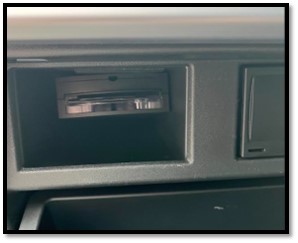
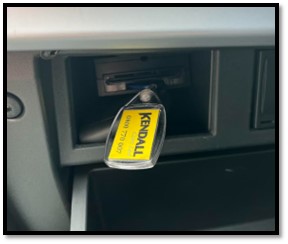
REMEMBER: While the vehicle is on hire to you, you must always keep the key with you and use it to look and unlock the doors during you hire period.
Fuel Card:
With Kendall Go we provide the fuel in the vehicle and you a required to make sure the vehicle has no less that a ¼ of a tank of fuel at the end of your hire period. To enable our customers to be able to add fuel you will find a fuel card in the same place as the key. You will find the pin code on the back of the card. All the Kendall Go vehicles take unleaded fuel. Once you have added your fuel to the vehicle, pull the card out and then use the pin code to pay for the fuel. You must give the vehicle registration when refuelling to the kiosk.
*** You do not need to keep the receipt for the fuel payment; however, we advise you to keep a copy encase Kendall Go require you to provide proof of refuelling ****.