Before You Return Your Vehicle.
Return your vehicle so it’s within the base area you collected from:
To be able to complete you rental the vehicle needs to be return within same base area you collected from. To see the base areas please click on the following link – WW1 / WW2. If you try to return the vehicle outside the base area it will not allow you to complete the hire and you will be charged until it is returned to within the base area.
Our vehicles have All Zone Parking In Wandsworth, an “All Zones” parking permit allows you to park in any Controlled Parking Zone (CPZ) within the borough, including both permit holder and shared-use bays. However, it does not guarantee a parking space, nor is it valid on red routes or in other boroughs.
Click here for a customer guide for parking with a Wandsworth All Zone Business Permit in Wandsworth outlining where you can and cannot park.
Here’s a more detailed breakdown:
What it allows:
- Parking in any CPZ:
The permit grants access to park in any area designated as a Controlled Parking Zone within Wandsworth.
- Permit Holder and Shared Use Bays:
You can park in bays specifically designated for permit holders and in bays that are shared between permit holders and pay-and-display customers.
What it doesn’t allow:
- Guaranteed Space: The permit does not guarantee a parking space will be available in any particular location.
- Red Routes: It is not valid on red routes, which have their own restrictions.
- Other Boroughs: The permit is not valid for parking in other London boroughs.
- Disabled Bays: The permit is not valid in disabled bays unless the vehicle also displays a valid disabled badge.
- Suspended Bays: It’s not valid in bays that have been temporarily suspended for any reason.
- Reserved Spaces: You cannot use the permit to reserve a space by coning off an area.
Additional Information:
- Vehicle Restrictions:
The permit is not valid for vehicles exceeding 3.2 meters in height, 6.5 meters in length, or with a maximum gross weight over 5 tonnes.
- Bank Holidays:
Yellow line restrictions remain in force on bank holidays.
- Business Permits:
If you have a business with an “All Zones” permit, you can park in any CPZ in the borough.
- Resident Permits:
If you live in a CPZ, you may be eligible for a resident permit, which also allows parking in your specific zone.
Your vehicle must be parked according to the above. If you park in a place that is not covered, and we receive a penalty charge notice you will be liable for the cost plus and administration fee.
Where to put the Key and Fuel Card:
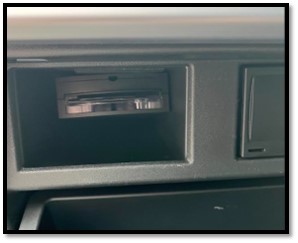
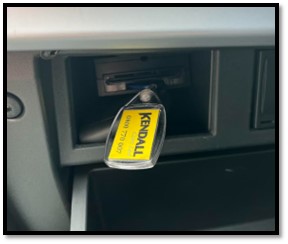
With our car sharing system the app will not allow you to complete your booking until you have returned the key and fuel card to the designated key/card hold. You will find this in the glove box. Please slide the card into the card slot and the keys blue fob into the other slot. Once you have completed this, please then close the glovebox making sure that it is closed securely.
Remove personal belongings and litter and Check the vehicle for damage and remove any litter before you finished:
This is a car sharing service which means the vehicle could already be booked for the next hire before we have chance to see it. We therefor ask our members to be respectful of each other and make sure they have removed all their belonging and any litter before they end there rental.
Before you complete your rental remember to check the vehicle externally and interiorly for any damage: Damage can be reported within the app. Please see the following app guide to see how – App Guide: Damage Reporting.
Remember: Damage that is covered by our fair wear and tear policy is/does not need to be recorded. You can find details on our fair wear and tear policy by clicking on the following link – Kendall Go Fair Wear and Tear policy. If you are unsure if the damage is covered or not, we always advise you to report and add it at the time of return.